

开打注册表:运行 regedit
导航至:HKEY_LOCAL_MACHINE\SYSTEM\CurrentControlSet\Services\W32Time\Config
修改 AnnounceFlags 值为 5
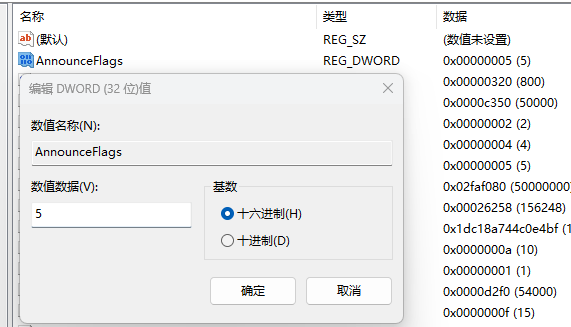
导航至:\HKEY_LOCAL_MACHINE\SYSTEM\CurrentControlSet\Services\W32Time\TimeProviders\NtpServer
修改 Enabled 值为1
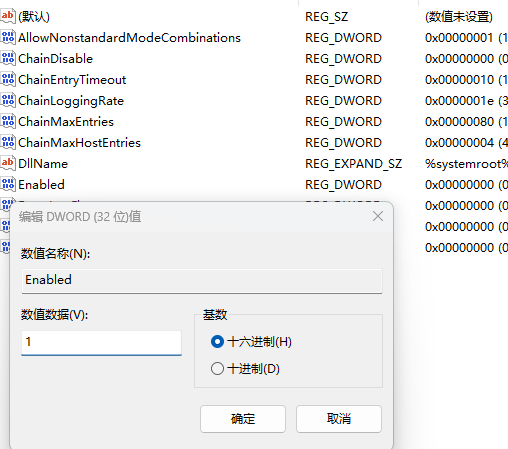
导航至:\HKEY_LOCAL_MACHINE\SYSTEM\CurrentControlSet\Services\W32Time\Parameters
修改NtpServer 值为上游ntp服务器
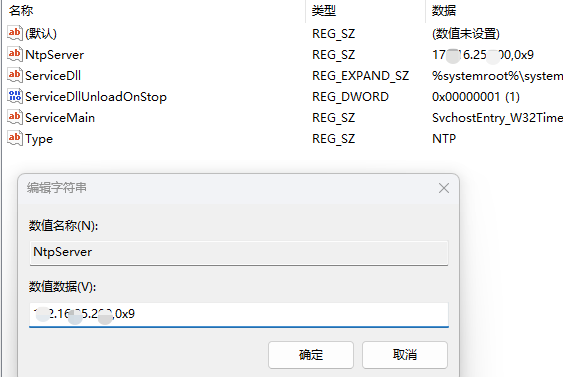
测试命令
w32tm /query /source
w32tm /query status
w32tm /query /configuration
w32tm /query /peers
防火墙放行 udp123端口